Want to watch TV on your Amiga? Remember watching analog TV with PalomaIV? Remember the WebTV applications? Well, ZodiTV is here. A solution for Amiga home computers with power such as Vampire and PiStorm. ZodiTV also works fine with A600GS and A1200NG!
But what is this? It smells a bit like Amitopia’s AmiTube and AmiFOX solutions to me,… Is it? Read on…
ZodiTV Brings IPTV Streaming to Amiga
A new application called ZodiTV, is pushing the boundaries of what Amiga systems with 68k can do today. ZodiTV is developed by Dominik “SirZodiac” Hohaus. This application introduces IPTV (Internet Protocol Television) streaming to AmigaOS. Something that would have been unthinkable on 68k Amiga’s just a few years ago.
Needs another computer for comfort!
Yes! Even if ZodiTV requires a stronger Amiga, it doesn’t reach todays standards in speeds yet for the 68k platform. This leads to same issue that alb42 and I was discussing before launching AmiTube. For some it is cheating, but for having a quality time with AmigaOS, such solution is necessary.
ZodiTV doesn’t need a WRP server on a PC or Mac running Linux, but it needs to be connected to a FFmpeg capable computer. It needs to be part of the same network as your Amiga is at. The FFmpeg machine transcode IPTV streams into an Amiga-friendly MPEG format in real time. Downloading a TV channel is quite impossible, so thats why ZodiTV requires more horsepower than AmiTube which downloads clips to your Amiga.
On the Amiga, then yoiu use FroggerNG or RiVA to stream. They are both capable MPEG players!
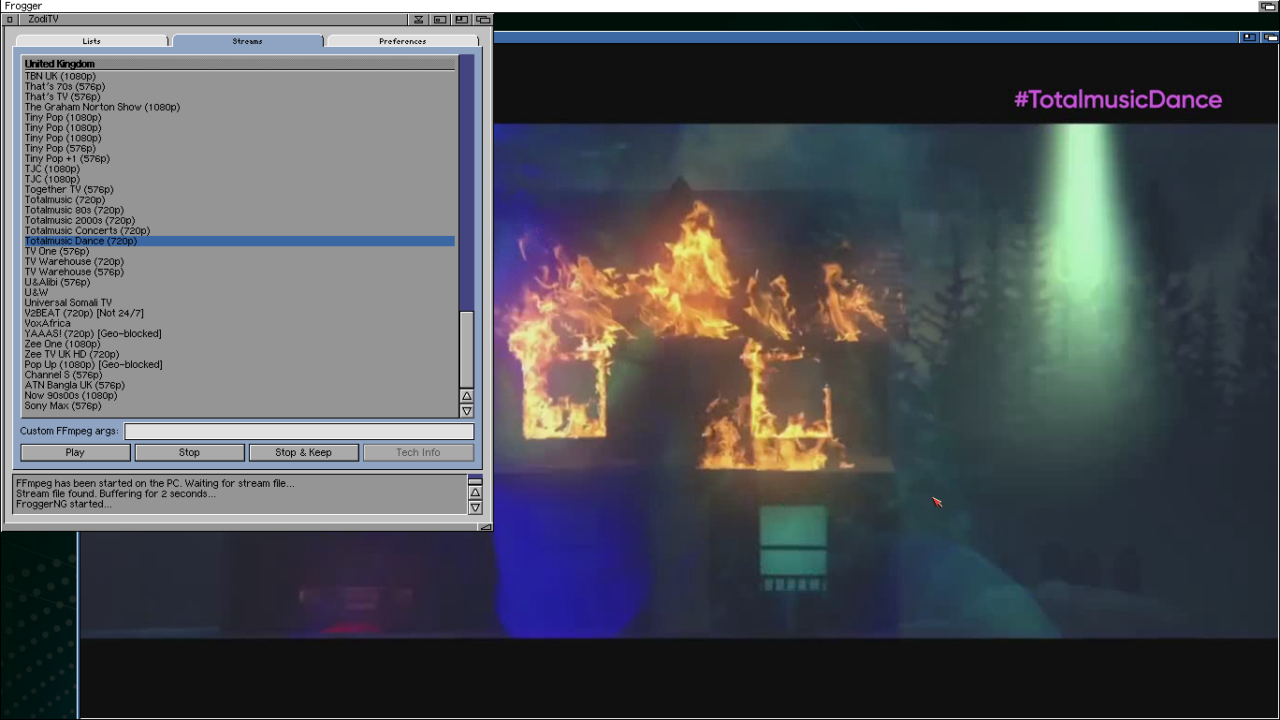
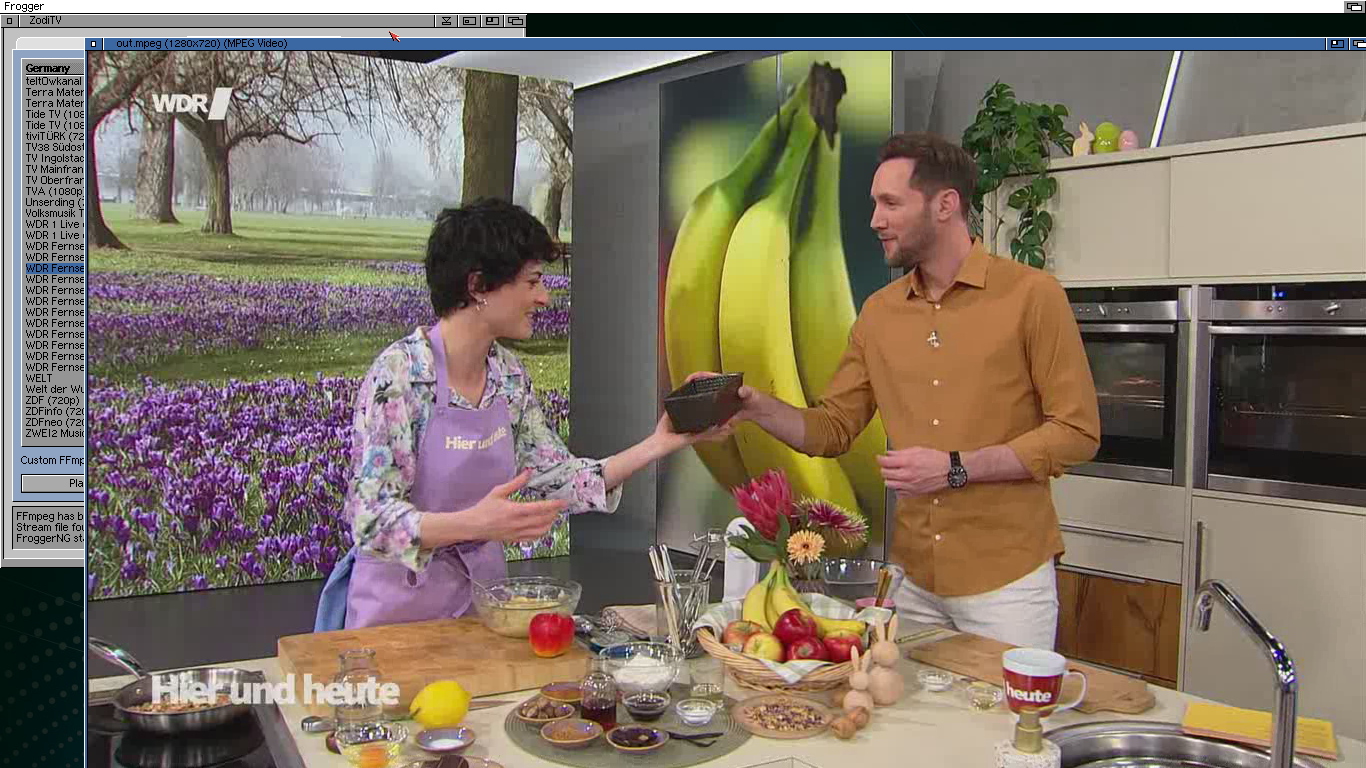
720p Playback on Amiga with ZodiTV
With ZodiTV, users can achieve smooth playback! It is even able to achieve up to 720p on accelerated systems like Vampire or PiStorm setups. This highlights just how far the Amiga platform has evolved with modern expansions since the 90’s, bringing it closer to the capabilities of contemporary PCs and Macs in specific use cases.
ZodiTV developers deserves a huge thanks for bringing this software to the platform. Enhancing the AmigaOS usage a lot!
MUI GUI for ZodiTV
By choosing MUI, the developers makes sure that ZodiTV can even be run on MorphOS and AmigaOS 4 setups. ZodiTV features a MUI-based graphical interface, allowing users to browse IPTV playlists, select channels, and control playback in a familiar Workbench environment.
ZodiTV supports custom stream lists, offers control over transcoding settings, and even allows users to save streams for later viewing.
AGA is not enough! Here are the Requirements
| Component | Details |
|---|---|
| Hardware | – RTG Amiga with – Fast Ethernet connection! – PiStorm and Vampire installed – A600GS and A1200NG |
| Operating System | – AmigaOS 3.2+ – AmigaOS 3.9 |
| TCP/IP Stack | – Roadshow – Miami – AmiTCP |
| SSL | AmiSSL v5+ (needed for HTTPS downloads) |
| MUI | MUI 3.8 or newer (also tested with MUI 5) |
| MUI Addon | MCC_NList 0.128+ |
| RTG | Picasso96 |
| MPEG Player | FroggerNG and/or RiVA (free on Aminet) | RiVA for Vampire (paid) which needs mpega_libmad.lha or mpega_library.lha |
| curl | curl 8.18 |
| SMB Filesystem | smb2fs + filesysbox (Not required when running under UAE) |
| PC shared directory | A folder shared via SMB that both the PC and the Amiga can read/write |
As I’ve mentioned above. You need a quite fast Amiga. But that’s not all.
ZodiTV requires a fast RTG-enabled Amiga system with networking, such as a Vampire, PiStorm, or similar configuration, along with AmigaOS 3.2 or newer. This reflects a broader shift in the Amiga scene, where enhanced hardware is unlocking entirely new categories of software.
ZodiTV is more than just a streaming tool. It’s a glimpse into the future of the Amiga platform.
By combining classic systems with modern processing power, developers are finding creative ways to extend the life and relevance of these machines far beyond their original design. ZodiTV takes Amiga further like AmiTube and AmiFOX does. To extend AmigaOS, the oldest commercial driven operating system in the world is just remarkable! Kudos!
Source: ZodiTV itch.io – Content and Images