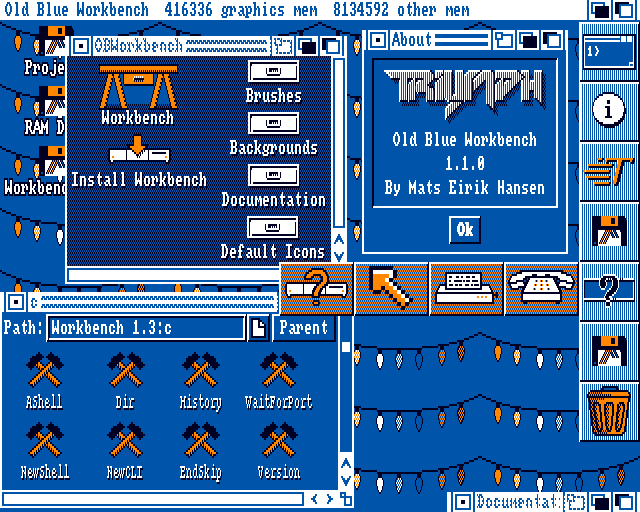
In the last update by Mats Hansen, which is out on Aminet now. Mats aims at improving AmigaOS 1.3 experience with this enhancement package called Old Blue Workbench.
In the latest update, Mats introduces an impressive set of features for Kickstart 1.3 owners, bringing a more refined user experience to the really nostalgic Amiga platform users. Let Amitopia delve into these enhancements with a detailed overview and a list of the most important improvements.
Old Blue Workbench main Improvements
- Enhanced Menus: The new Workbench boasts menus similar to those in Workbench 2.0, providing users with an intuitive and familiar interface. This makes it easier for Amiga enthusiasts to navigate and access various functions.
- Improved Windows and Drawers: With support for window and icon menus as context menus, users can now interact with windows and drawers more efficiently. Additionally, the lasso feature allows multiple icons to be selected at once, offering increased productivity.
- Customizable Backgrounds and Fonts: Old Blue Workbench enables users to configure backgrounds and fonts according to their preferences, enhancing personalization and user experience.
- Browser Windows: The updated Workbench includes browser windows for browsing the file system, making it easier to locate and manage files on your Amiga.
- Enhanced Info Windows: Users can now modify icons and swap colors in Info windows with ease, offering more control over their desktop appearance.
- User-Defined Menus: The ability to create custom menus adds a layer of flexibility and convenience for users, allowing them to tailor the Workbench experience to their specific needs.
- Docks and Drag & Drop Support: Docks in Old Blue Workbench support dragging and dropping icons, providing an efficient way to organize and access frequently used tools or applications.
- Startup Tools: Users can now launch tools at startup, streamlining the process of getting up and running with their preferred software and settings.
- User-Defined Global Hotkeys: With support for user-defined global hotkeys, Amiga users can customize window management and other functions to suit their workflow preferences.
Additionally, Old Blue Workbench includes the necessary libraries for compatibility with older systems.
What’s New in v1.2 Old Blue Workbench
The latest update for Kickstart 1.3 users introduces version 1.2 of the Workbench replacement package Old Blue Workbench, which offers a host of new features and enhancements to the Amiga platform.
This release that you can find on Aminet aims to improve usability, customization, and overall performance while providing users with more control over their desktop experience.
One of the most notable additions is the inclusion of navigation buttons that allow users to move forward and backward in the path history or display disks in browser windows. Users can now show assignments in both Workbench and browser windows when “Show All Files” is selected, making it easier to manage files and folders. Another useful feature is the double-click background functionality, which enables opening a browser window by double-clicking the background of the Workbench window. While this option is disabled by default, users can enable it in the General Settings window for increased convenience.
The update also introduces a Browser Settings window, where users can customize settings for browser windows opened from the Project menu or via double-clicking the background in the Workbench window. This added flexibility allows users to tailor their browsing experience according to their preferences. Other enhancements include the ability to position icon names on the right side of the icon in browser windows, a filter bar that makes it easier to locate specific files, and an updated layout for browser windows that adjusts automatically when adding, removing, or resizing icons.
Improvements on speed and Minimum Requirements
Performance improvements have been made as well. Scrolling through drawer and browser windows with many icons is now faster, and several bugs have been fixed, including issues related to input handling, dragging and dropping disk icons, displaying incorrect icon counts, and updating protection flags when changing icon settings.
The Minimum Requirements for Old Blue Workbench requires a minimum of 1MB of memory, making it accessible to a wide range of Kickstart 1.3 owners. This means you need to own an OCS Amiga that can be upgraded with more RAM.
In conclusion!
Old Blue Workbench by Mats, version 1.2.0 of the Workbench replacement offers a range of new features and improvements that will enhance the user experience for Kickstart 1.3 users. By addressing performance issues, adding customization options, and introducing useful functionalities, this update demonstrates a continued commitment to the Amiga community and their beloved platform.
The “Old Blue Workbench” Workbench enhancement upgrade package brings a wealth of enhancements to Kickstart 1.3 users, improving usability, customization, and overall user experience. With its refined interface and expanded functionality, Amiga enthusiasts can enjoy a more streamlined and efficient workflow on their beloved platform.